Resume & Interview Starter Guide
Improve your resume and practise interview answers with templates.
Explore this eBook →50+ formulas explained simply, VLOOKUP, pivot tables and 4 real office projects
Learn the Excel that offices actually use – step by step, with examples you type along with.
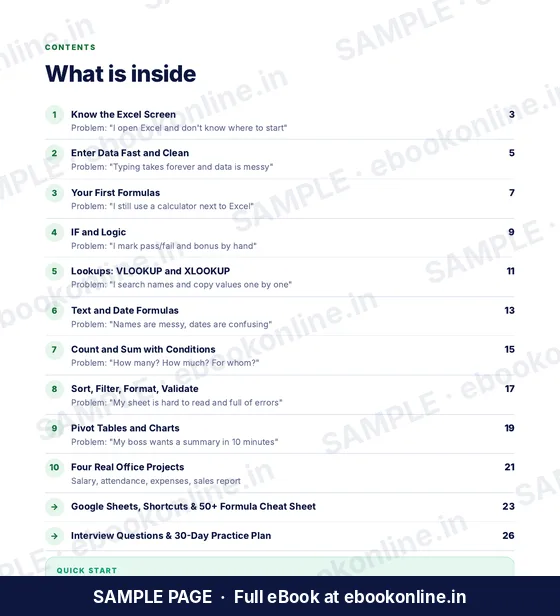
Each chapter starts with a real office problem and solves it with spreadsheet examples. You learn clean data entry, formulas, IF, lookups, text and date formulas, COUNTIF and SUMIF, sorting and filtering, and pivot tables – then use them in four office projects. Hinglish tips, a 50+ formula cheat sheet, Google Sheets notes, interview questions and a 30-day practice plan are included.
Digital PDF eBook. After payment, you are taken to a page where you can download the file. Nothing is shipped.
This eBook is not available to buy yet. Please check back soon.

Every topic below is covered in the book.
Cells, formula bar, workbooks and sheets.
Flash Fill, Tables and clean data.
SUM, AVERAGE and locking cells with $.
IF, AND, OR and IFERROR.
Find values without copying by hand.
TRIM, PROPER, DATEDIF and more.
Count and add with conditions.
Summaries in minutes.
LOOK INSIDE
A few real pages from this 28-page PDF, so you can see the layout before you buy. Tap a page to enlarge it.
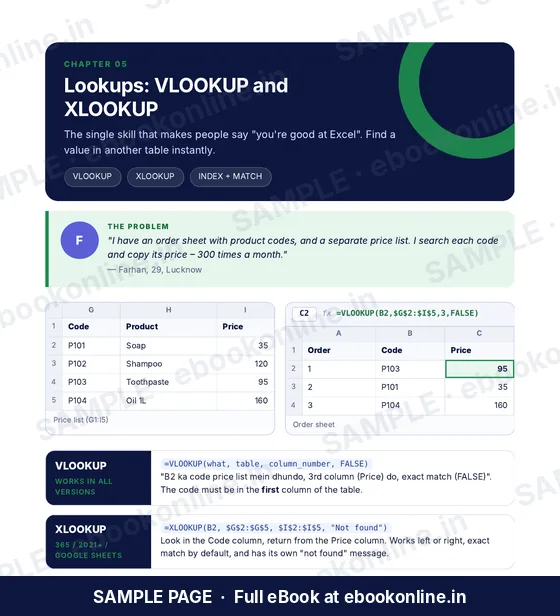
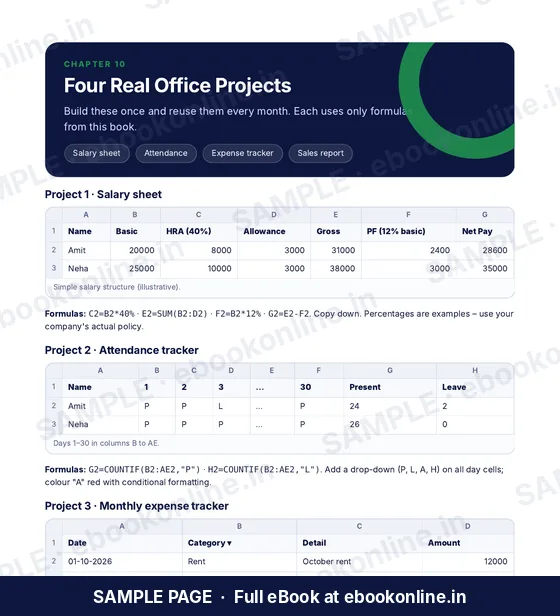
Screens and menu names can differ slightly between Excel versions and Google Sheets. XLOOKUP is available only in newer Excel versions; the book shows VLOOKUP as well.
A 28-page downloadable PDF. Each chapter starts with a real office problem and solves it with spreadsheet examples. You learn clean data entry, formulas, IF, lookups, text and date formulas, COUNTIF and SUMIF, sorting and filtering, and pivot tables – then use them in four office projects. Hinglish tips, a 50+ formula cheat sheet, Google Sheets notes, interview questions and a 30-day practice plan are included. Everything is inside one PDF; nothing is shipped.
Any recent Excel works. Where a feature like XLOOKUP needs a newer version, the book also shows the older method. Google Sheets notes are included.
Yes. Worksheets in the chapters, 4 office projects and a 30-day practice plan.
Yes. It is written for beginners and assumes no previous experience.
A downloadable PDF. After your payment is completed, you are taken to a download page. The download works for 1 hour on the phone or computer you paid from, with up to 3 downloads. Save the file and open it in any PDF reader.
Contact us through the support form (see Contact / Support in the footer) and include your payment receipt or confirmation.
Screens and menu names can differ slightly between Excel versions and Google Sheets. XLOOKUP is available only in newer Excel versions; the book shows VLOOKUP as well.
Open a blank sheet and type along with Chapter 1.
₹99
Get the eBook